Take-offThe problem
- 01
Communication gap
Symptoms get lost between child, parent and doctor.
- 02
Emotional gap
Families need counsel. Doctors are busy diagnosing.
- 03
Expectation gap
Parents want quick results from treatment.
- 04
Operational gap
Missed follow-ups, forgotten prescriptions.
A doctor who has to rely on memory
Kids with chronic conditions like asthma need their symptoms watched closely, but they spend most of the day at school or play. In the clinic, the pediatrician depends on what a worried parent and a child can recall.
Read the full story
Problem — The parent pediatrician gap
Kids with chronic conditions like Asthma require frequent monitoring of their symptoms. Pediatricians face challenges as kids & parents find it difficult to identify & track symptoms, especially since kids spend most of their time at school or play.
Defining the gap
- Communication gap — Pediatricians rely on what the kid & the parent say during consultations. Miscommunication of symptoms happens when parents don’t know what’s happening.
- Emotional gap — Parents & kids are concerned about the condition. They need counseling as they have many questions, but pediatricians hardly get time because they’re busy diagnosing.
- Expectation gap — Parents have unreal expectations and want quick results from the treatment plan.
- Operational gap — Parents usually miss follow-up appointments, and forget to carry their prescriptions during the appointment.
Going back to how it started
In August 2023, we initiated a project targeting chronic diseases. Given the alarming pollution levels in India, addressing a high-impact, high-urgency respiratory disease was our main goal.
Scoping down to pediatric Asthma
- India accounts for 12.9% of the global 262 million asthma cases.
- 42% of asthmatic adults have asthma onset before age 16.
This system is currently optimized for Asthma & respiratory conditions, however, it can be scaled to other chronic conditions that require data-driven consultations.
Who we listened to
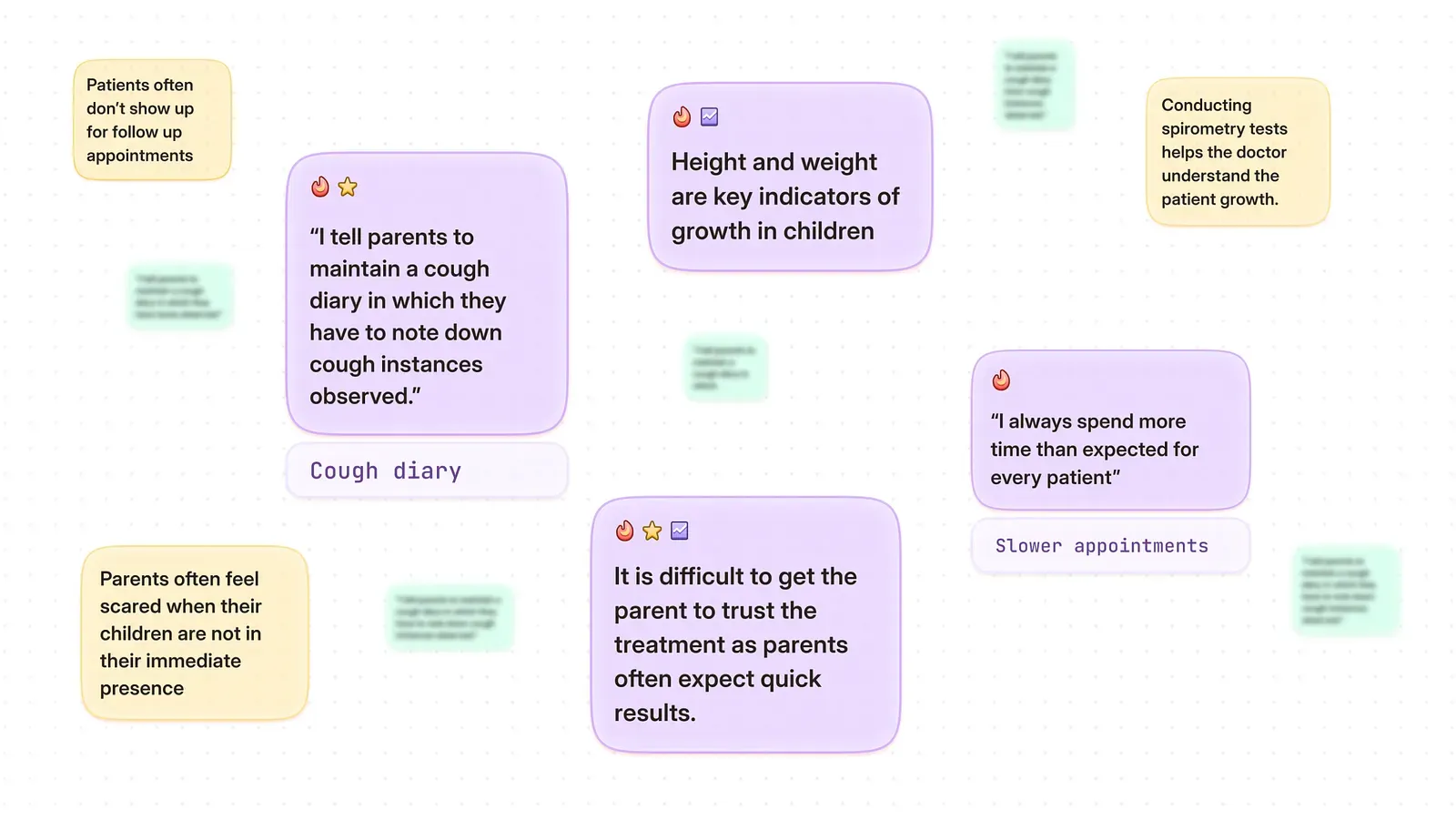
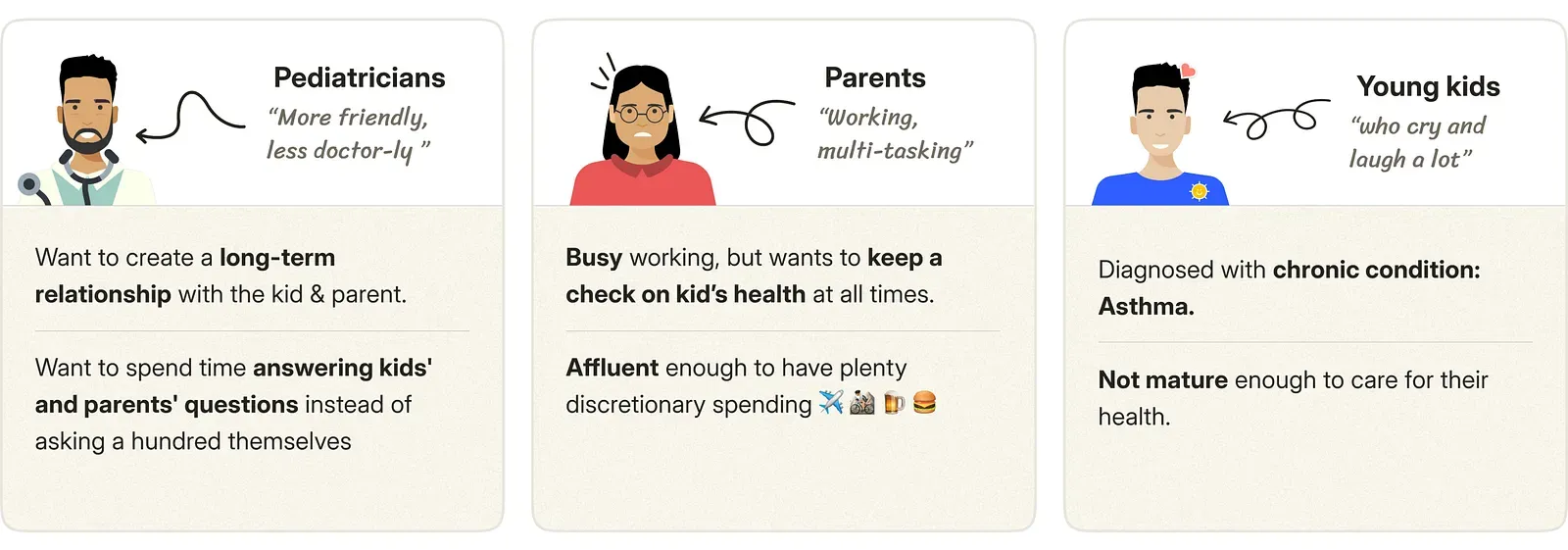
We talked to 7 people who grew up with asthma and 2 pediatricians. Most of the insight came from the pediatricians, the only ones with a view of both the child's and the parent's side.
Read the full story
Understanding the pediatric system
We talked to 7 asthma kids (now adults) & 2 pediatricians.
What did we try to understand?
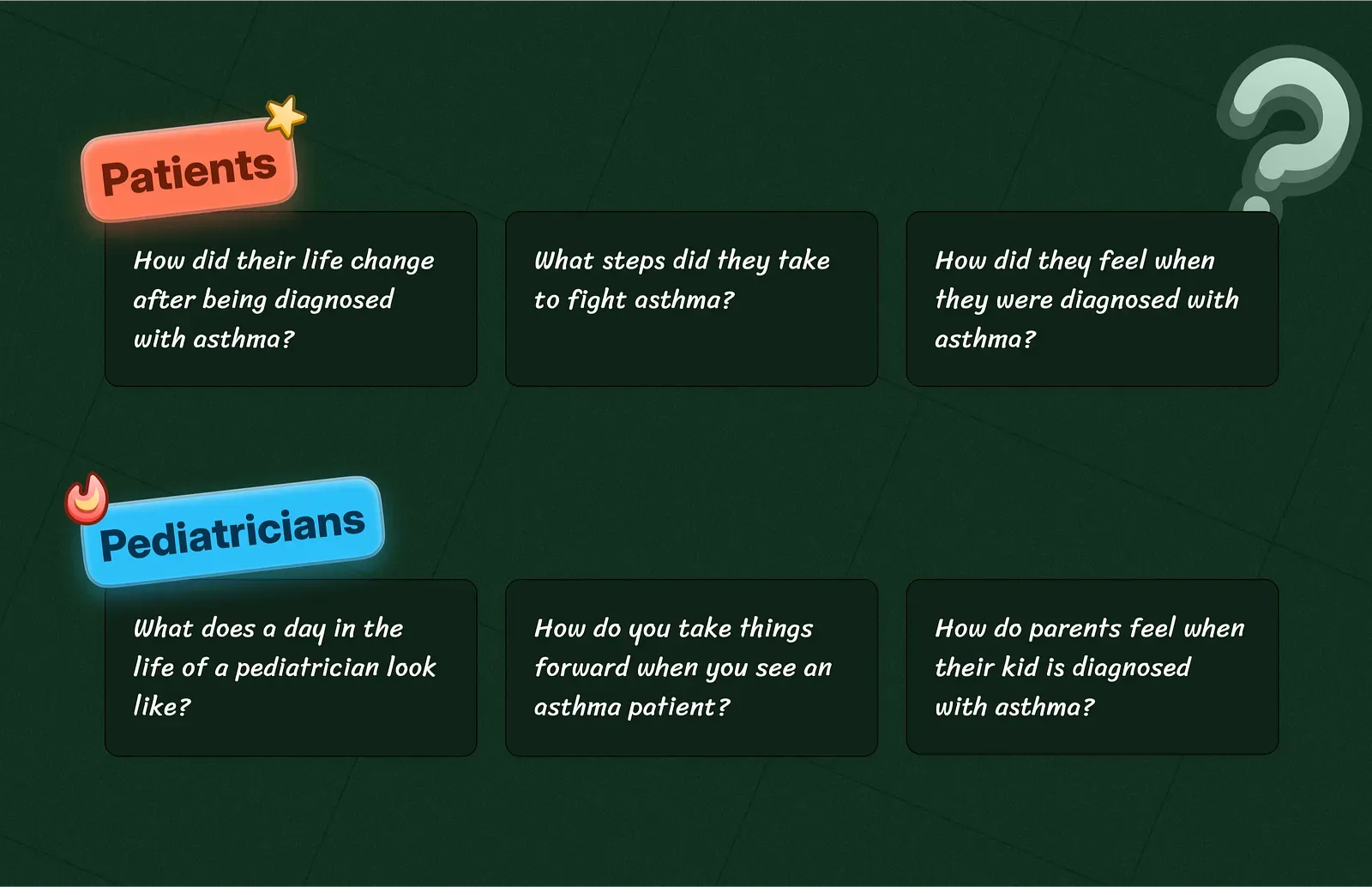
Interestingly, most of the insights came from pediatricians. In other words, pediatricians were the only pillar of the system who had the top-level view of both, the kid’s and parent’s side.
Key takeaways from the interviews?
Consulting kids is not as easy as it sounds
- Pediatric consultations are dependent on the conversation between pediatricians, parents, and the kid to identify health issues.
- The ability of kids & parents to articulate their concerns correctly is a major factor.
The emotional toll on parents
The whole situation has the parents on edge. They’d do anything to feel in control of their child’s condition. Be it asking questions to pediatricians or googling for hours.
Who are we designing for?
CruiseThe work
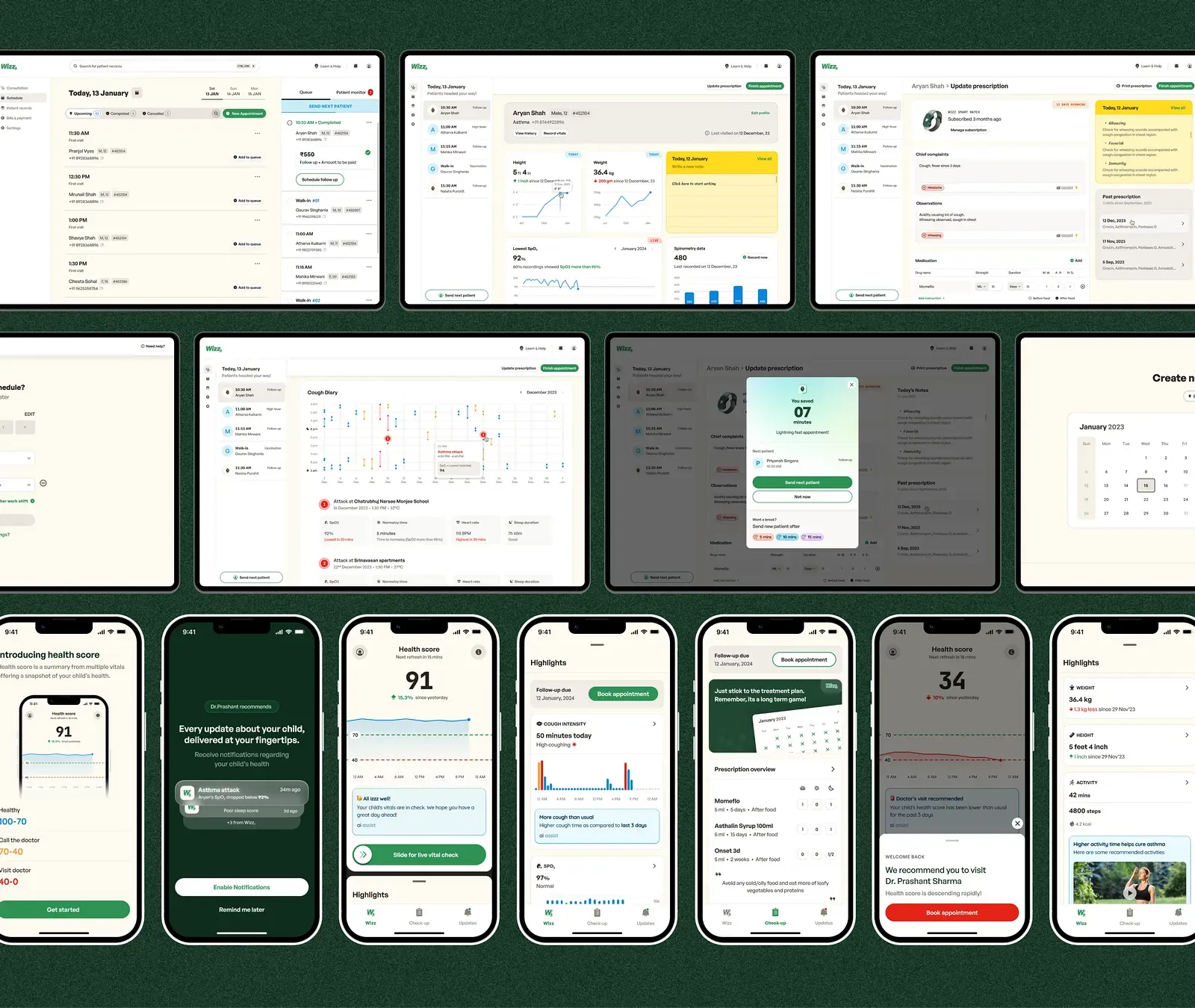
A band, a dashboard and an app
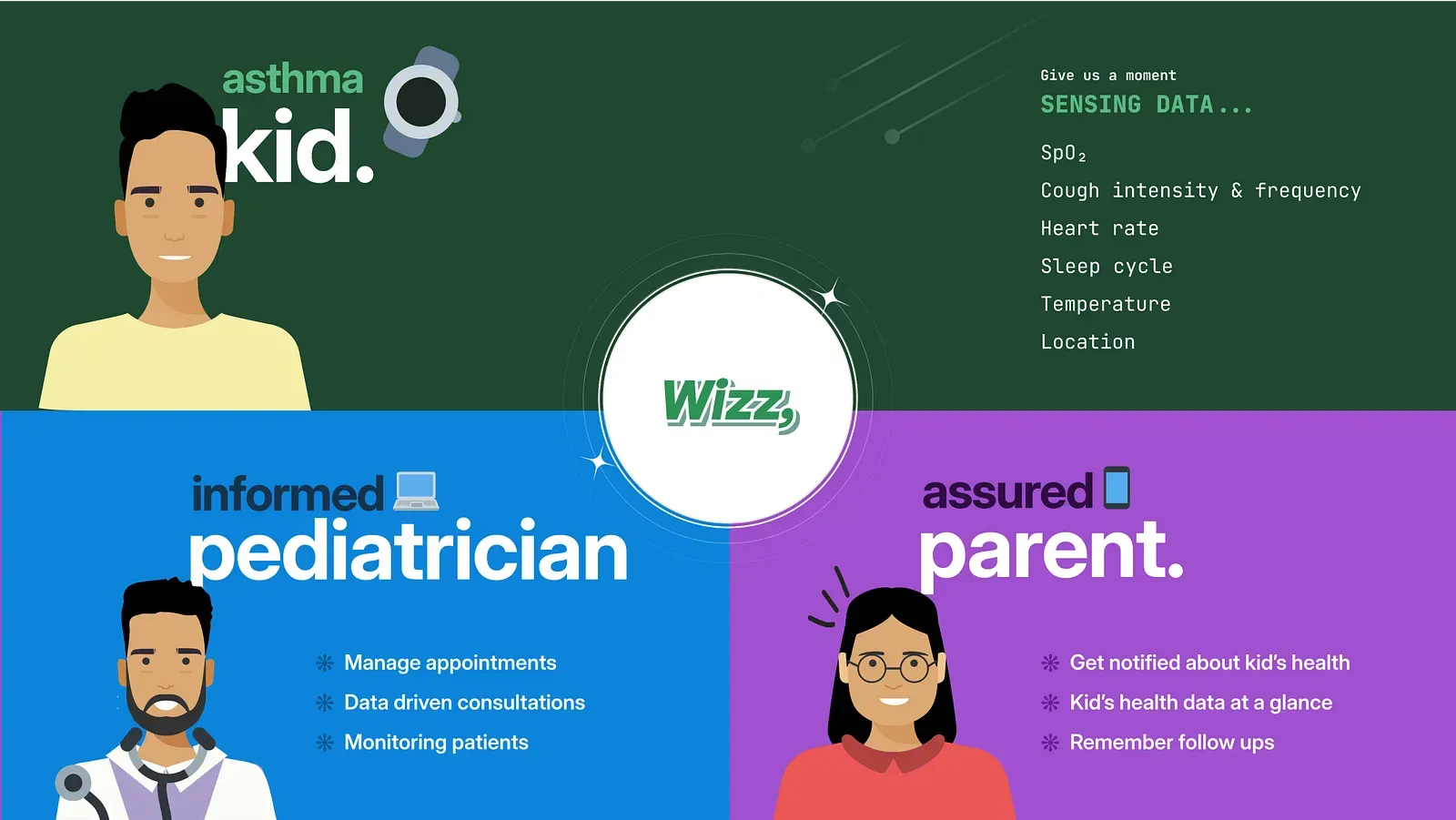
Wizz uses health data from a band the child wears, so pediatricians can make faster treatment decisions while parents stay informed through an app. The pediatrician prescribes the band and the parent subscribes.
Read the full story
Solution
Wizz utilizes health data from kids’ bands, enabling pediatricians to make faster treatment decisions. Meanwhile keeping parents informed daily through an app, to make them feel in control of their kid’s health.
Highlights
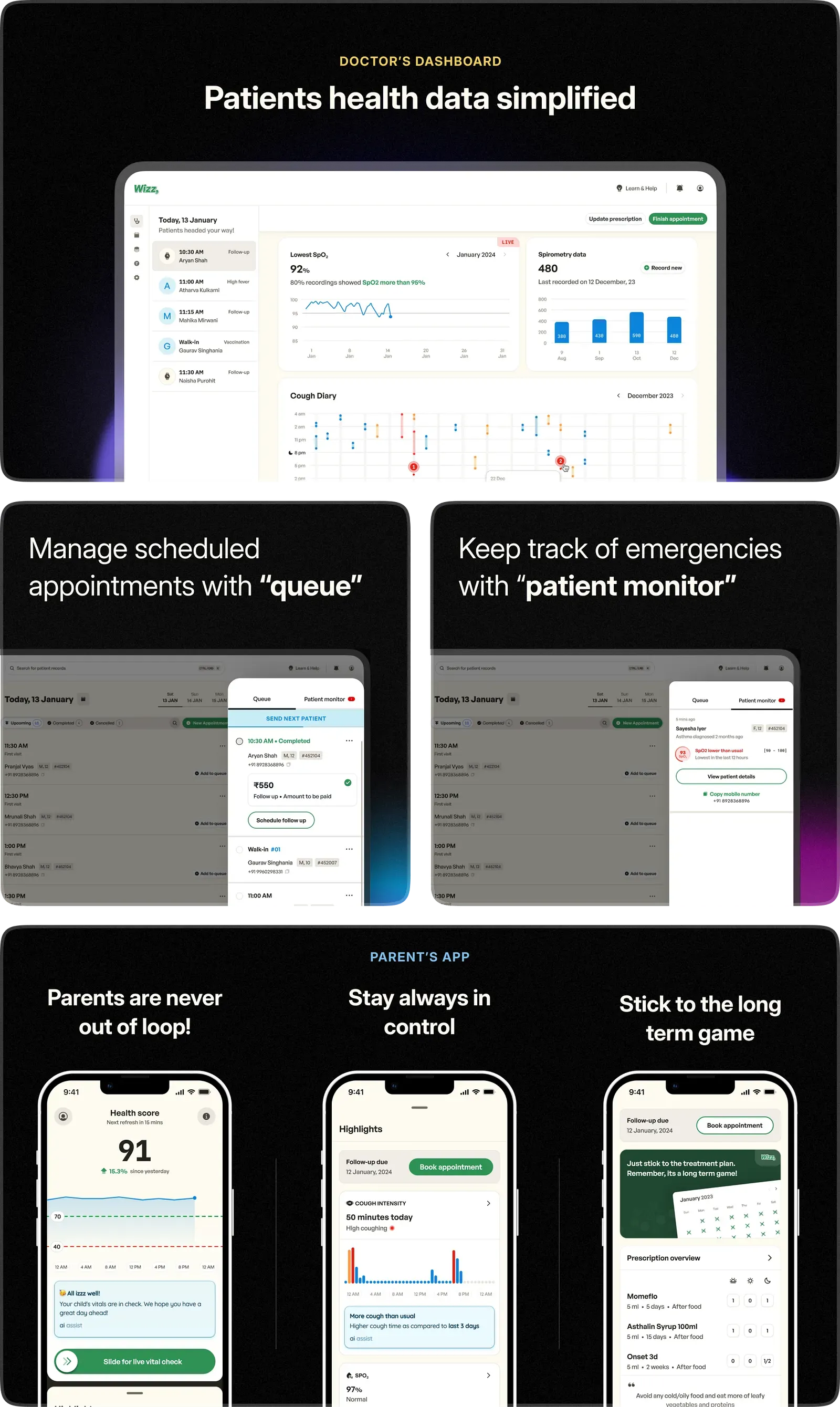
Introducing Wizz
Our future vision for the pediatric ecosystem after Wizz.
We defined a B2B2C model, wherein, pediatricians will prescribe the Wizz band to the kid, as a part of the prescription. We’re offering a subscription service to these parents, who will ultimately pay for it. This subscription helps reduce the cost of the watch for the parent.
- 01
Parent calls to book
- 02
They arrive at the clinic
- 03
Height and weight recorded
- 04
They see the pediatrician
- 05
The bill is paid
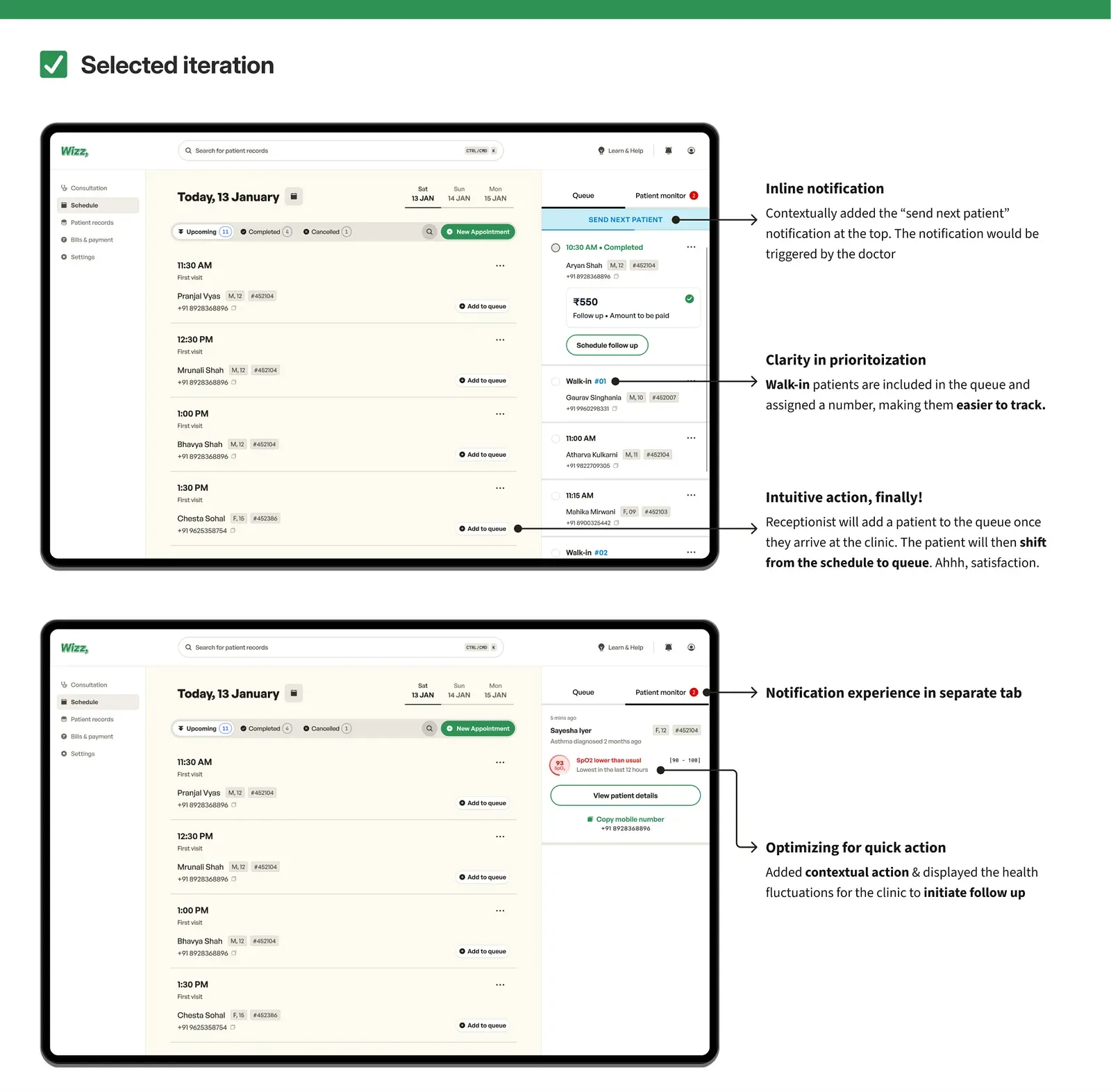
The queue was the breakthrough
We first built something like a calendar. Real clinics have no-shows and walk-ins, so the day's schedule never matched the waiting room, and a live queue did.
Read the full story
Pediatrician’s dashboard
Top-level goals
- Using health data to reduce patient consultation time.
- Enhance clinic management experience for them to serve more patients.
In the pediatrician’s hands, words matter more than medicine. Imagine a visit where doctors understand patients before they speak. Our goal? Turning appointments into comforting conversations.
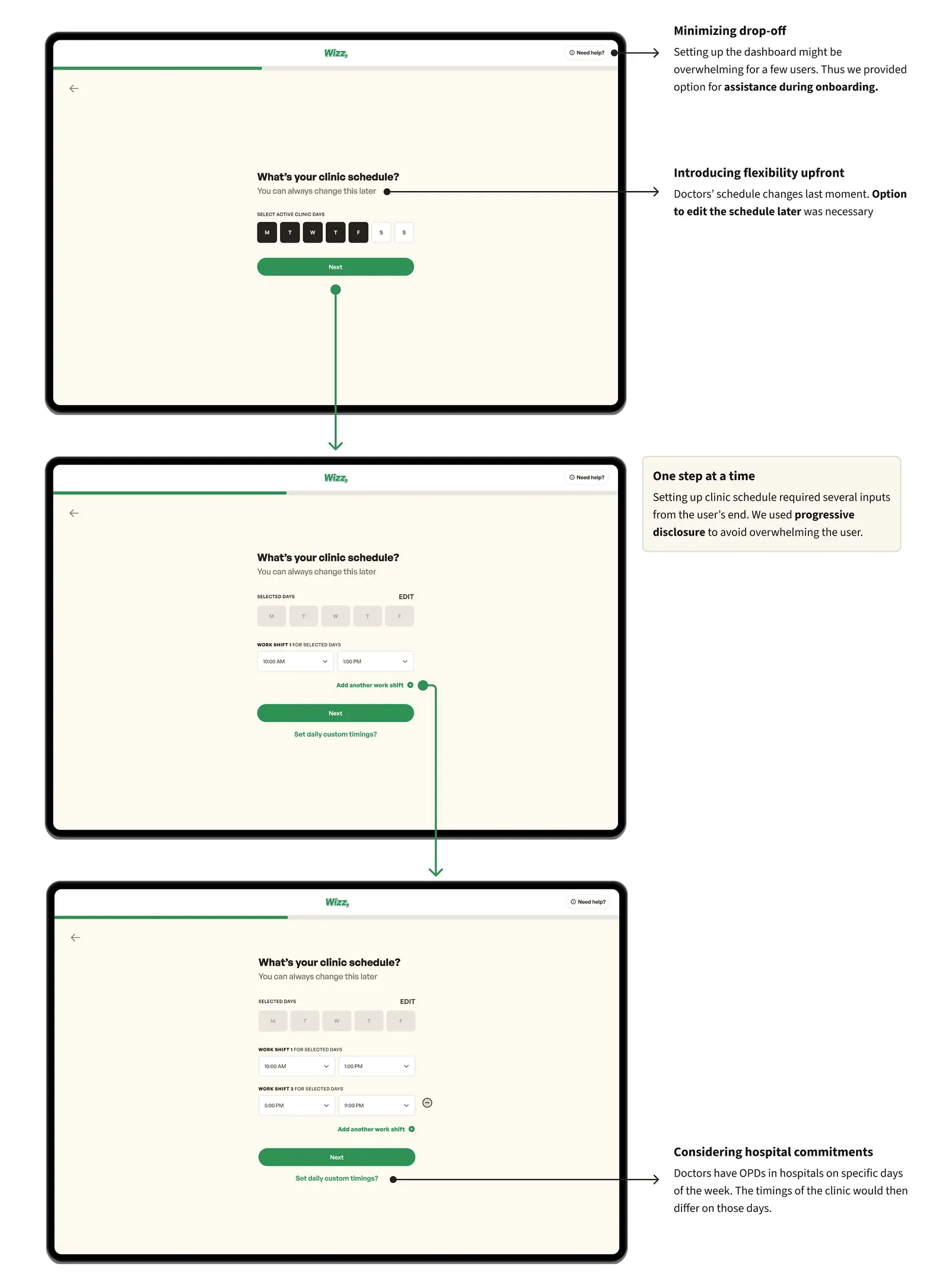
Onboarding pediatricians to Wizz
This is the first time for the clinic team to set up the dashboard for overall operations.
Watch the prototype video on YouTube
Eliminating repeating tasks via onboarding
Let’s dive deeper into the finer details of the onboarding.
The functioning of the whole system depends on a lot of data points from the clinic’s side. Asking about this essential information now would prevent the repetition of inputs later.
- Clinic timings for appointments
- Consultation charges
Adding appointments to the clinic schedule
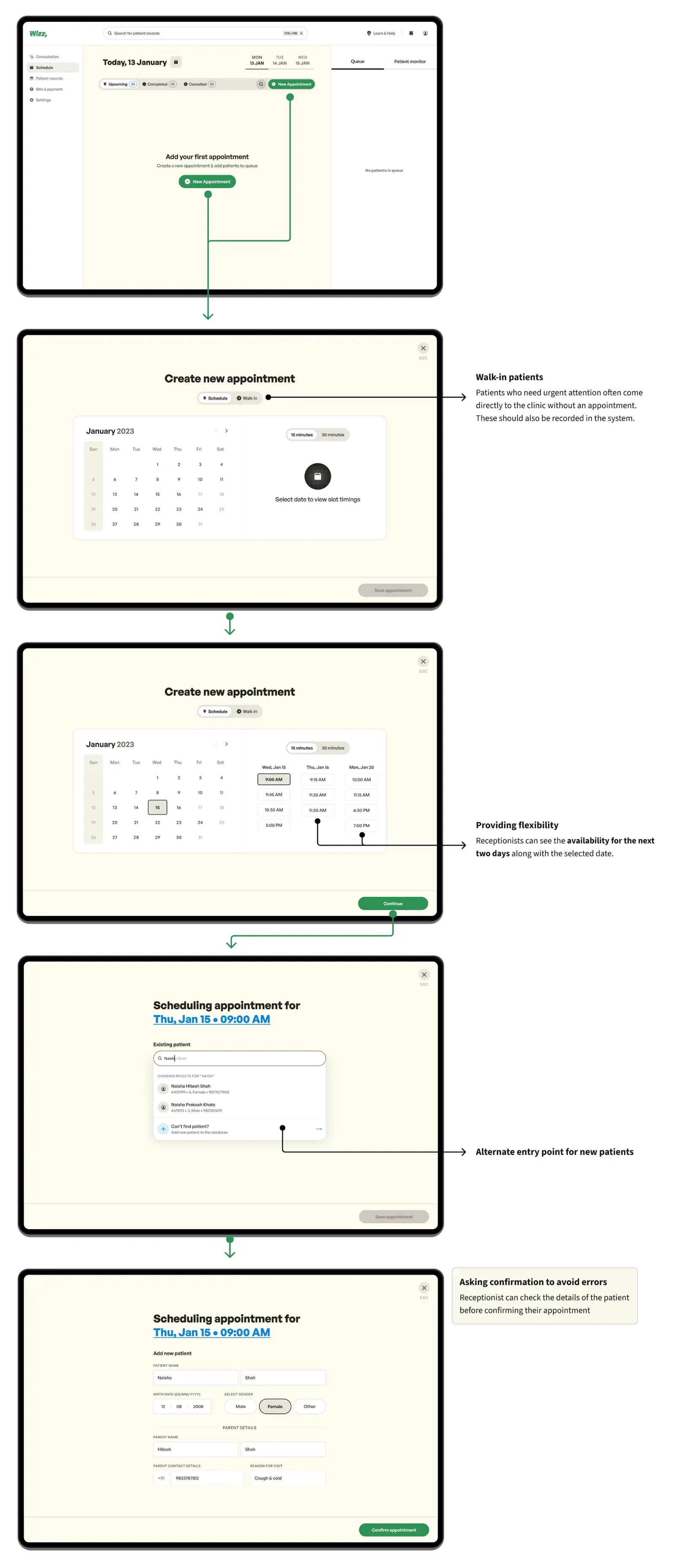
The “schedule” tab is where the users would land after the account setup. It was important to let them start their journey of building the appointment schedule as it would be a part of user activation.
Watch the prototype video on YouTube
Designing for a busy receptionist
Imagine a receptionist who picks up a parent’s call. The receptionist is already dealing with the patients sitting at the clinic and assisting the pediatrician when required.
This is a lot to handle for the receptionist, so the scheduling flow had to be simple, with as few inputs as possible.
The schedule tab
First thought
Ahh, our fresh minds couldn’t think about how complex this could be. We imagined — “just build something similar to a calendar and we’ll be done.” However, designing the schedule was the most challenging aspect for us.
It involved a complete workflow, from managing patients & bills to scheduling appointments and documenting patients’ height and weight. Let’s understand the journey better.
Stages of the appointment journey
- The parent calls the clinic to book an appointment. (1–2 days beforehand)
- The parent and kid show up at the clinic.
- The receptionist documents growth indicators like height and weight.
- The parent and kid finally see the pediatrician.
- The parent pays the bill at the counter.
Back to square one — Our aha moment
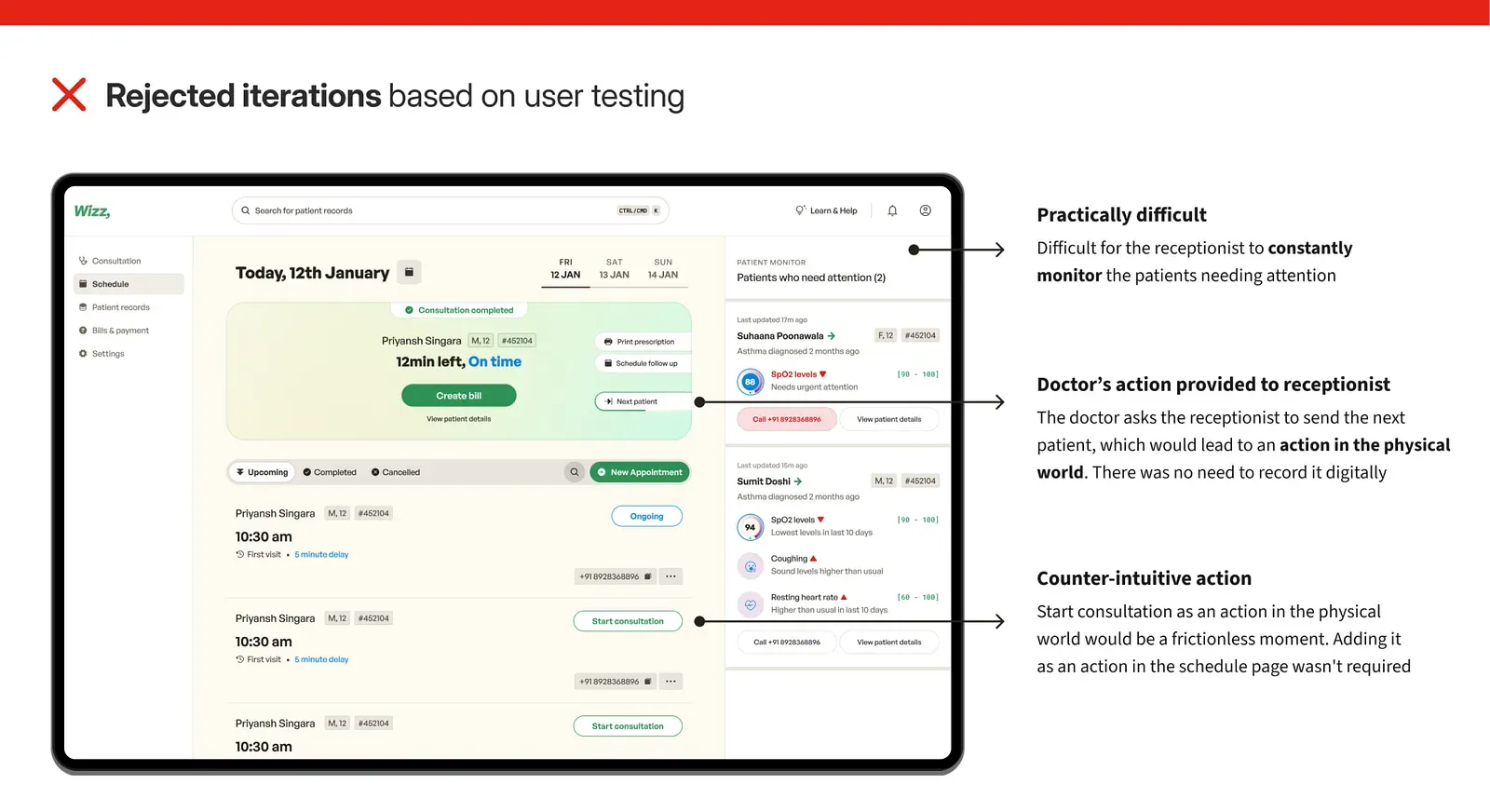
Let’s assume, a typical clinic has 15 scheduled appointments, but only 10 show up at the clinic, with a few extra walk-in patients. After every patient, the pediatrician “rings the bell” to call the next one in. Our goal was to design a scheduling system that would fit into this existing workflow.
A few mistakes we made —
- Misjudged the core user jobs, and granted the receptionist certain tasks which were ideal for the pediatrician. Assigning the action to the wrong user was a major failure.
- The schedule displayed all patients for the day, but problems arose due to “no-shows” and patients arriving late/early, this meant that the list of patients in the schedule and the patients sitting in the waiting room would mismatch.
This led to the creation of the “queue”, which may seem obvious but it was a breakthrough moment for us.
Watch the prototype video on YouTube
How did the creation of “queue” help?
- Height and weight are recorded before adding a patient to the queue, making sure the receptionist never misses out on the step.
- The pediatrician only sees patients waiting in the queue, not the entire daily schedule full of no-shows.
A consultation read at a glance
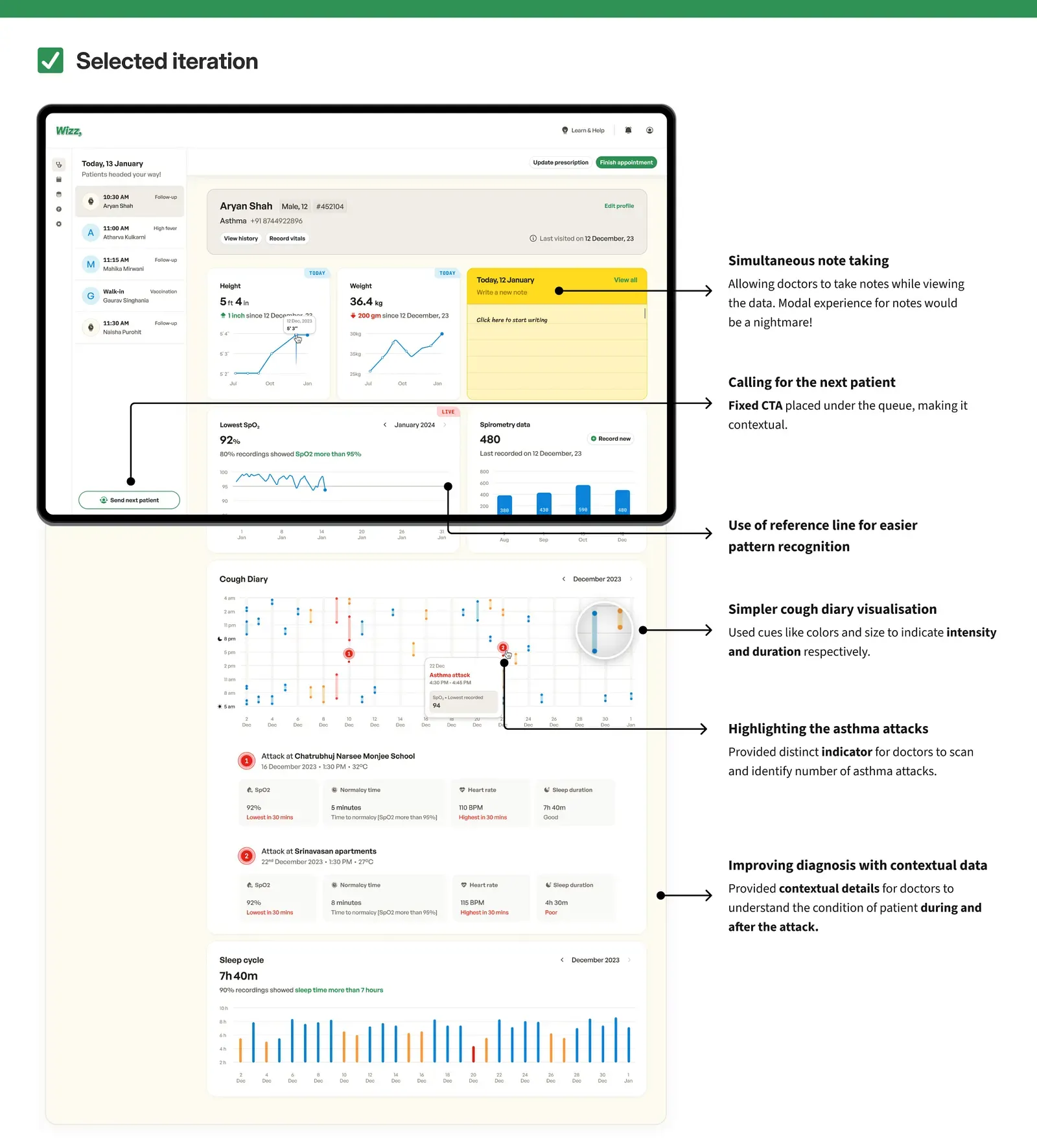
The consultation screen combines data from the band with the doctor's own notes. We show patterns and urgency up front and leave the conclusions to the expert.
Read the full story
The data-rich consultation experience
The consultation tab in the navigation is like the pediatrician’s “home” in our dashboard. It’s the place where a pediatrician would spend most of their time.
It’s a data-heavy experience, incorporating health data from the Wizz band and previously recorded data by the pediatrician. This is a lot to comprehend, if not designed well.
Understanding the basics of the consultation
- Importance of height & weight — For kids, height & weight are key growth indicators.
- High usage of note-taking — Pediatricians use notes to remember health complaints they get from parents and kids. They also write down things that are important to check next time.
- Cough diary — Pediatricians advise parents to maintain a diary to understand the frequency & intensity of coughing.
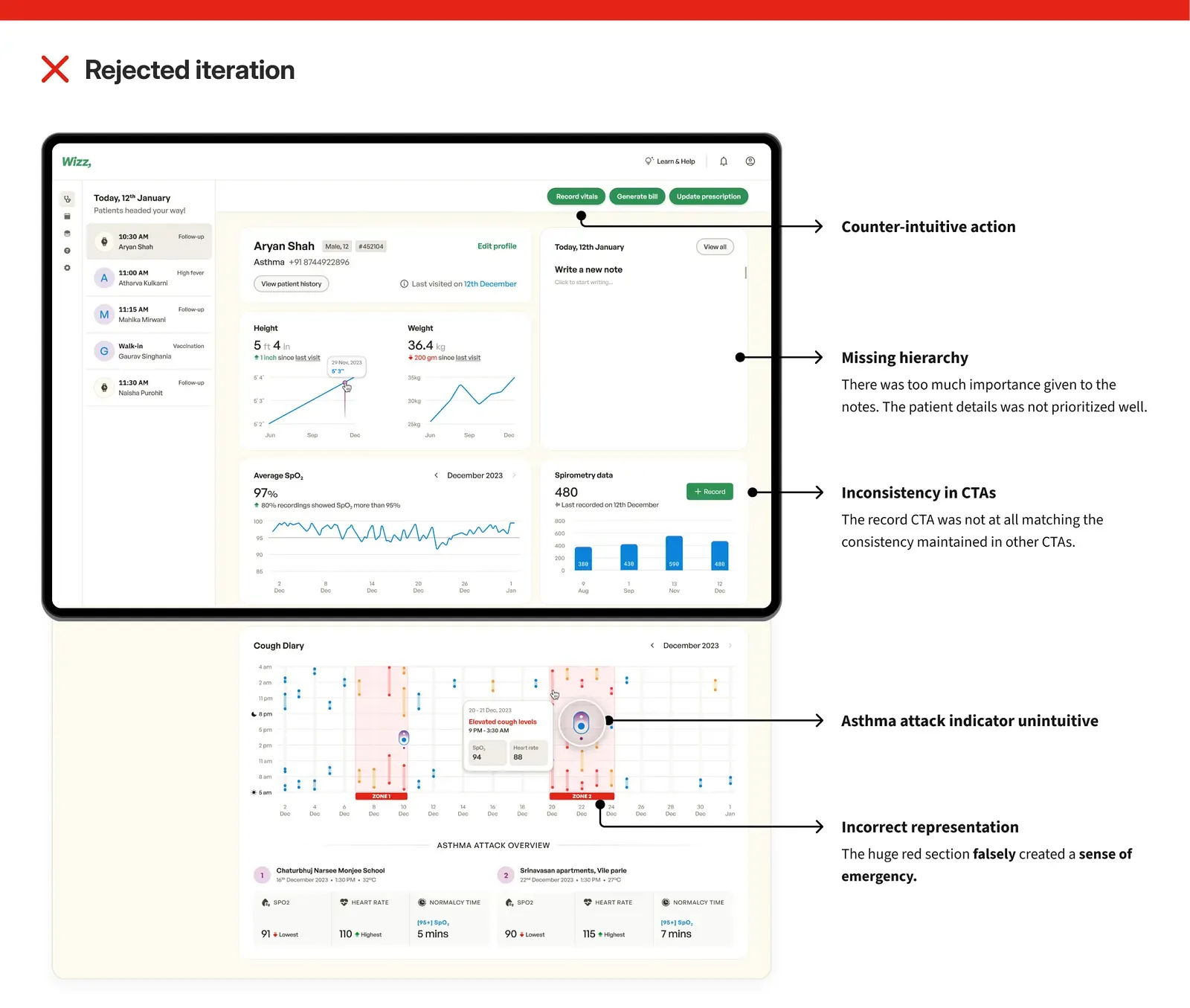
Categorizing and prioritizing information based on its importance to the pediatrician was missing. To tackle this we decided to go back to the strategizing phase.
Putting things back together!
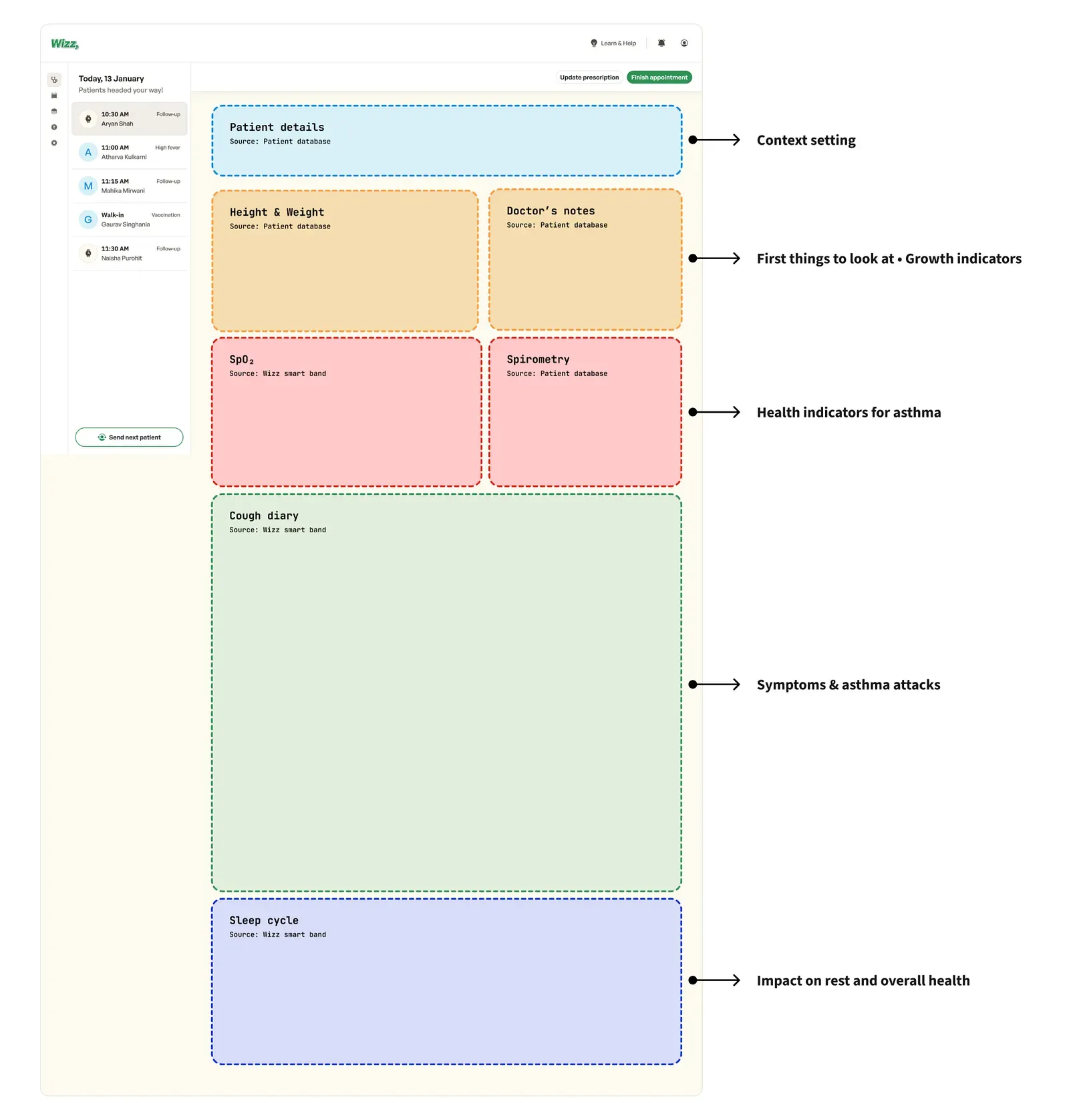
Strategies to stay consistent with data
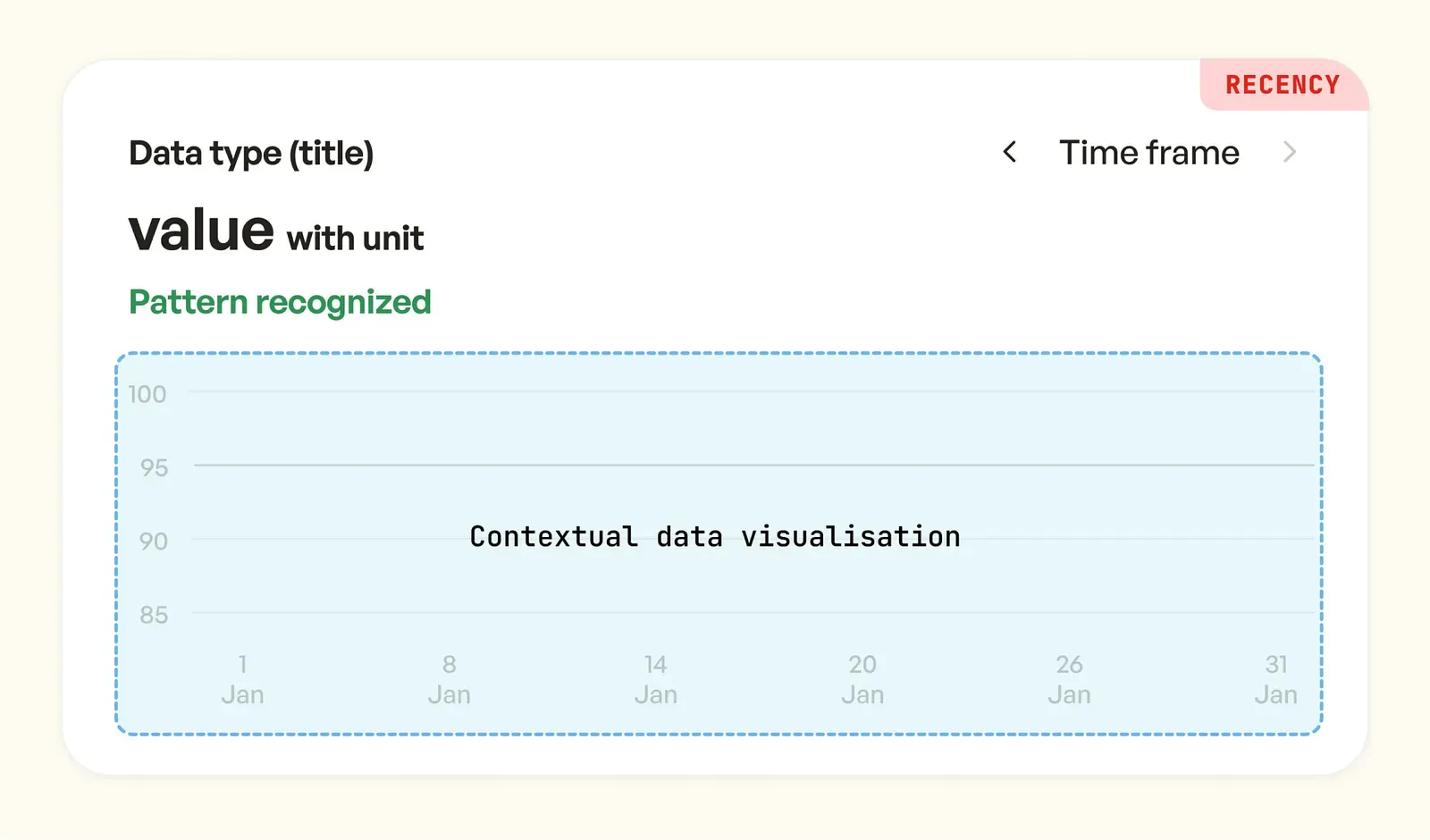
We came up with a few overarching guidelines for every health data we showed. The pediatrician is an expert user, it was important to not spoon-feed the insights but to help them better identify the patterns. Let’s understand a few guidelines —
- The use of color to highlight urgency vs normalcy.
- Indicate patterns or movement in the data upfront, but don’t form insights for the pediatrician.
- Have consistency of the data label, the value, and the description or pattern.
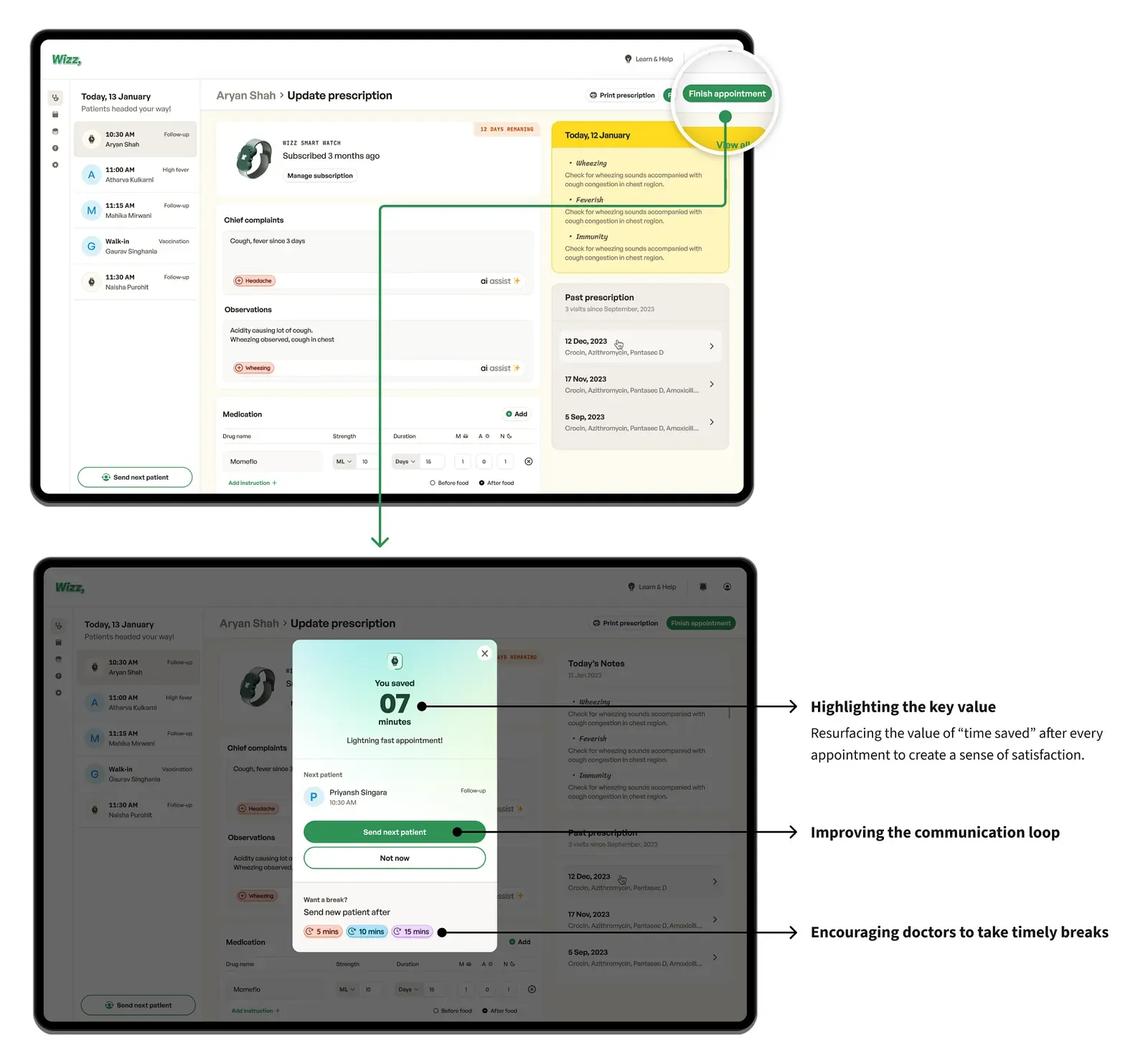
Prescriptions in half the time
Most of what a pediatrician writes in a prescription is repeated information. Assisted prescription fills that in, with the goal of cutting writing time by half.
Read the full story
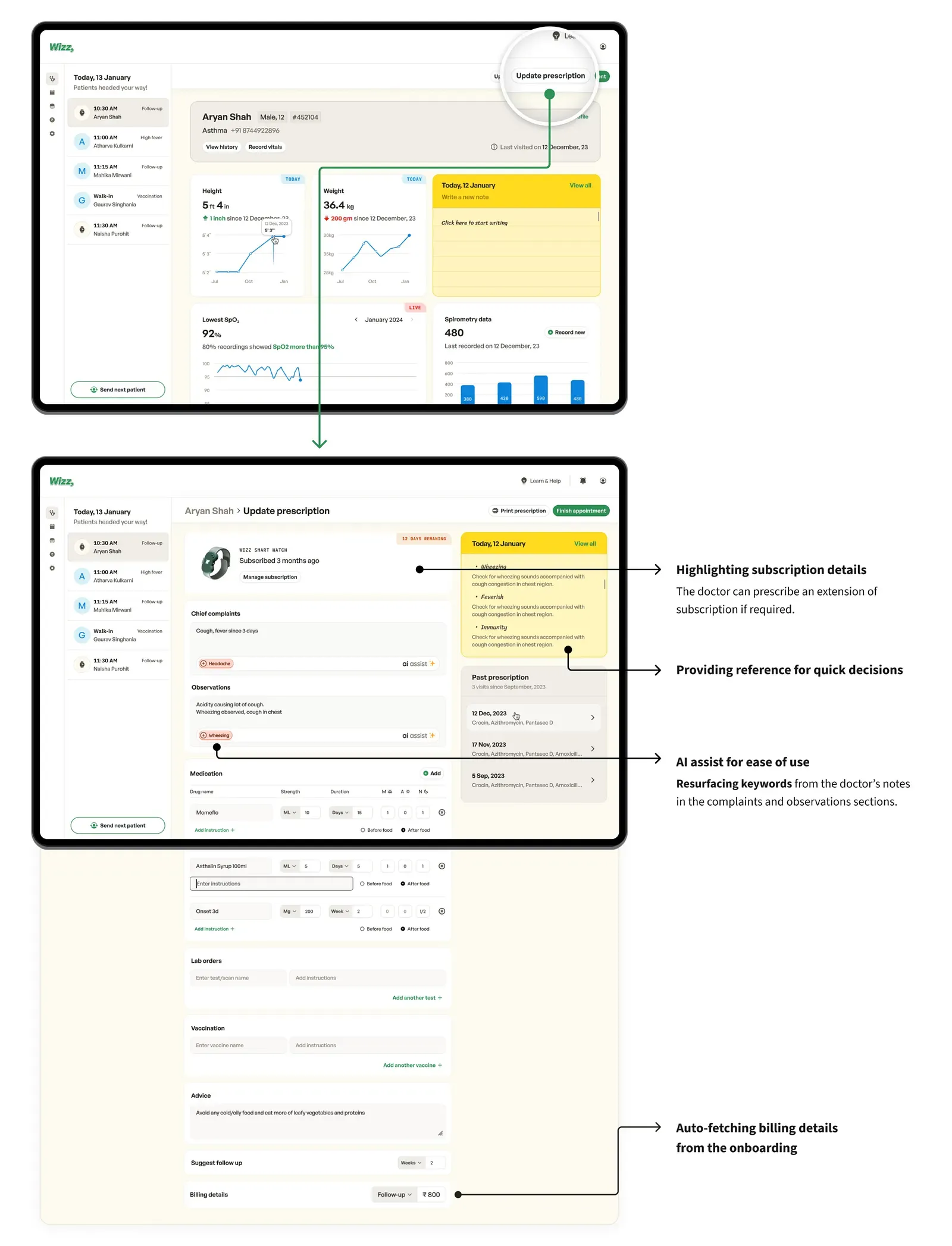
Updating prescription — Lightning-fast experience
The goal here was to cut down the prescription writing time by half. Pediatricians currently spend extra time writing notes, observations, and complaints, while most of it is repeated information. We used “assisted prescription” to solve this.
Closing the appointment — sprinkling some delight!
Based on the peak-end rule, re-establishing the core value of the product at the very end was important.
One number for an anxious parent
Parents did not need a wall of vitals, they needed to know whether today is better or worse. A single health score answers that, and a deliberate slide-to-check step slows down a worried parent who would otherwise keep refreshing.
Read the full story
Parent’s app
Top levels goals
Scenario
Meet Mrs. Chitra Shah. She’s the mother of an 11-year-old boy with asthma. Following the pediatrician’s advice, she subscribed to the Wizz band and downloaded the Wizz app to stay updated on her kid’s health. Chitra checks the app once or twice at work to see how her child is feeling.
Onboarding the parents
Most parents feel supremely concerned after their kid is diagnosed with a chronic condition, so it was important to highlight the need for parents to be tension-free and calm at every step.
Watch the prototype video on YouTube
Laying the foundation of the home screen
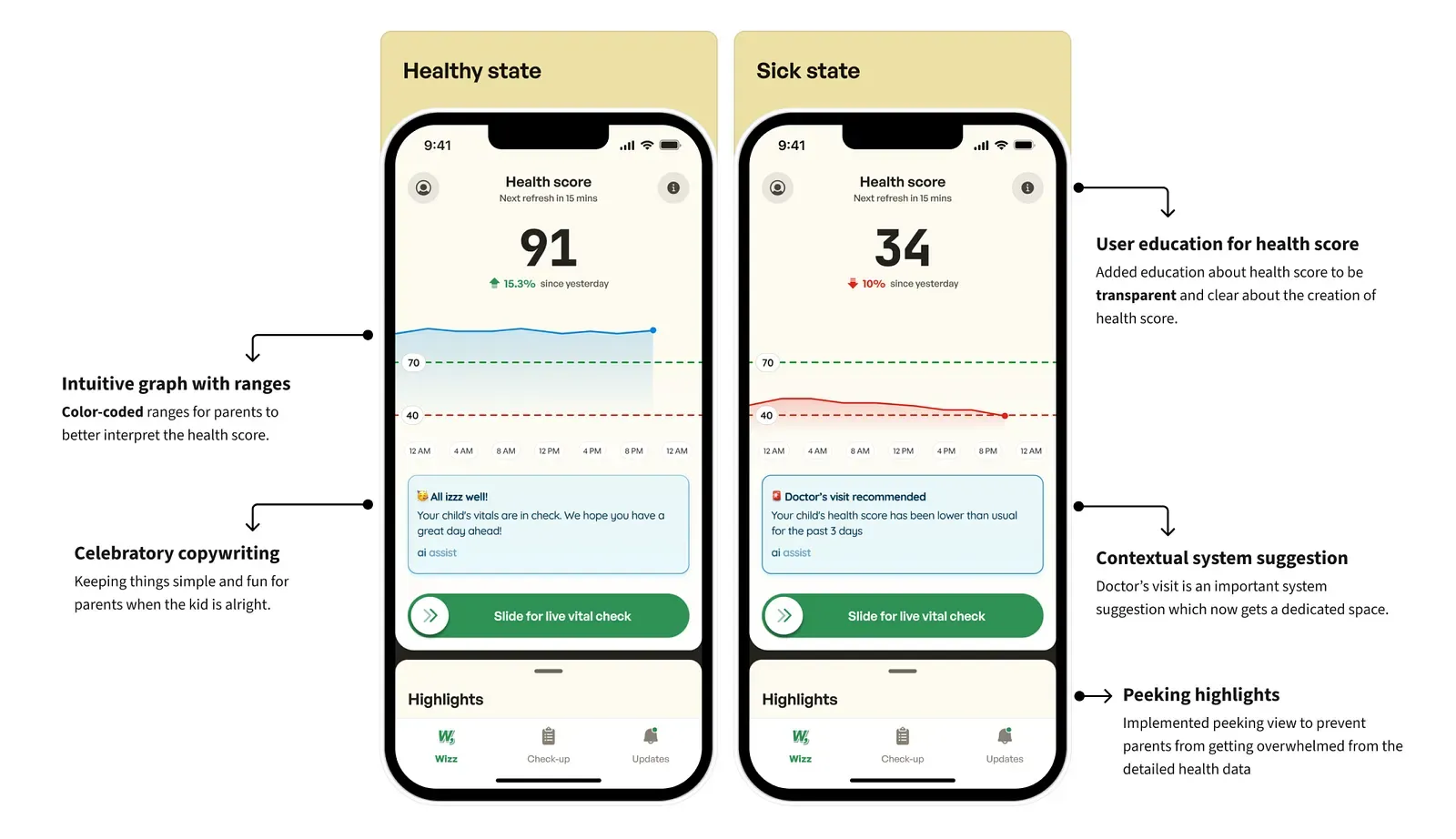
The core use case here was to inform parents about their kid’s condition using real health data, in a way that avoids overwhelming them. To sum it up, the data had to be understandable at a single glance. This led to the creation of a health score.
What is a health score?
A health score summarizes multiple vitals offering a snapshot of your kid’s health.
Constructing the home screen
Let’s step back and understand what the parents want to see when they glance at the home screen. We had a few guidelines in mind before we started designing.
- Don’t bombard parents with 5–6 health vitals, only show the health score.
- Show the change in health. Parents want to know if the situation has improved or worsened from the last time they saw the kid.
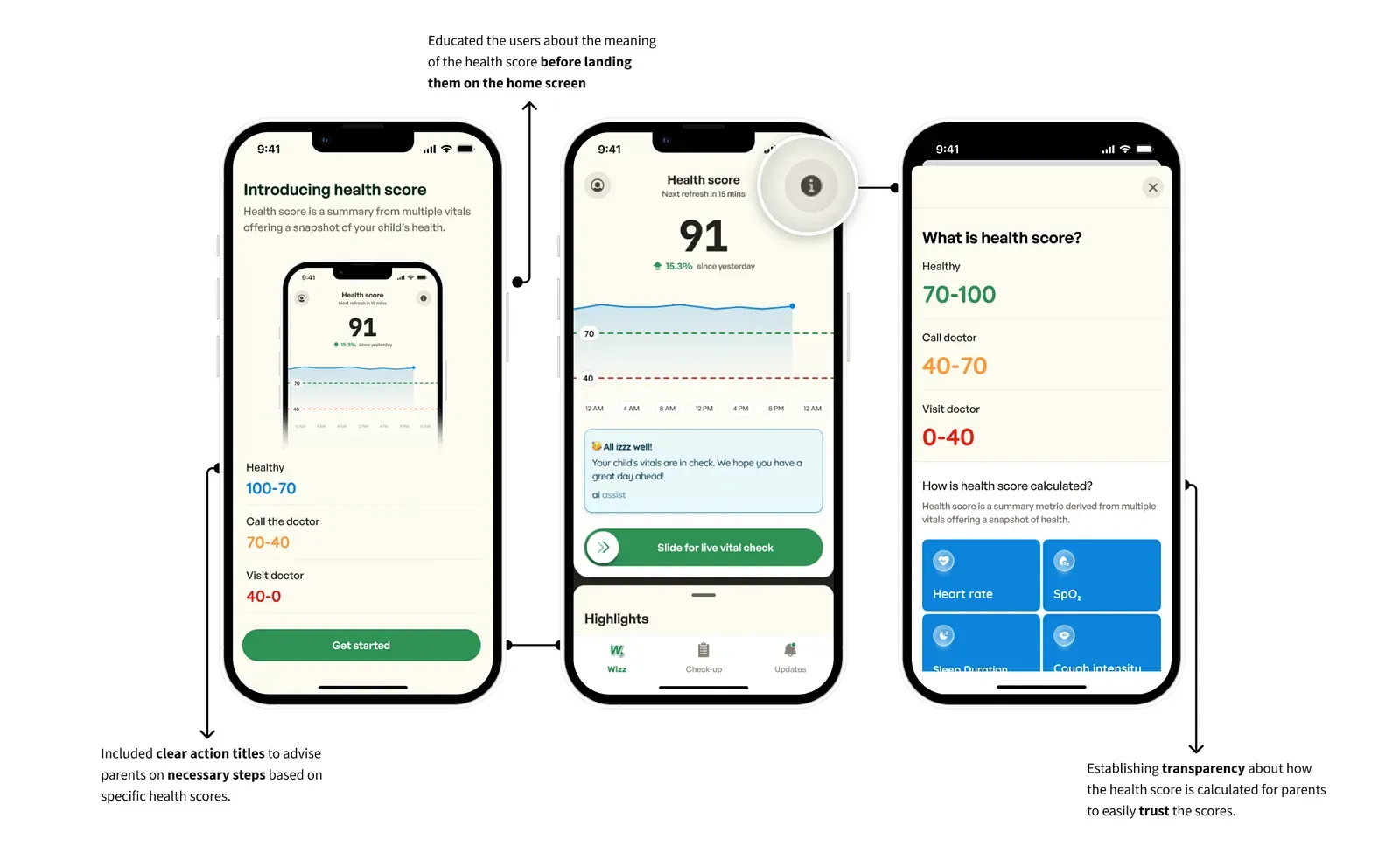
Health score was something we created from scratch, so it was important to educate users to instill trust. What was a good or a bad score? The meaning of the score had to be very clear.
Initiatives to educate users about health score
Introducing friction — Live vital check
The health score is updated every 15 minutes, and a parent whose kid is sick might become impatient. To tackle this, we added the “slide to live vital check”, which means parents had to take action to check their kid’s health in real-time. Check out the video to see this in action.
Watch the prototype video on YouTube
Updates — Designing the notification experience
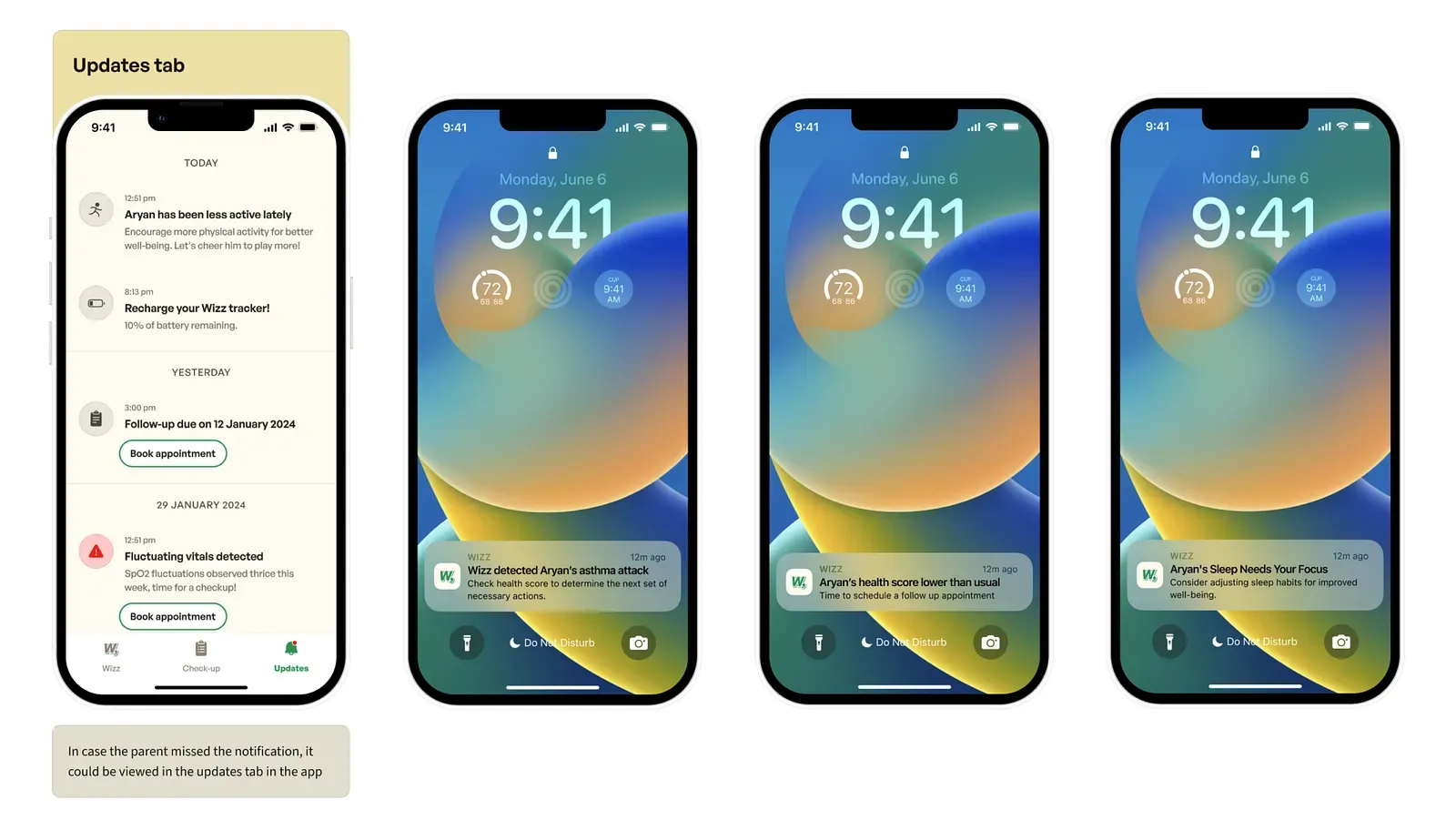
Being a health product, the notification experience was critical. The parents had to be kept in the loop by informing them about any fluctuation in the data, at the same time, triggering their anxiety would be the last thing needed.
To design the notification experience, we had a few guidelines in mind. We refrained from keeping the voice of the notification as quirky and fun, rather it had to be simple and direct. Additionally, the subtitle always had to include an action point for parents.
LandingThe result
30%
Shorter process turnaround
Projected
43%
More patients seen daily
Estimated
What it should change
Wizz is a concept, so these are projections: a 30% shorter process turnaround and an estimated 43% more patients seen daily. If it shipped, we would measure time to prescription, patients consulted per day and missed follow-ups.
Read the full story
Metrics to measure success
If we were to ship this design, there are some metrics we would need to monitor, to be able to measure the impact.
Pediatrician’s dashboard
Our goal with the whole system was to make pediatric consultations faster and more accurate. Now let’s break down the correct way to measure it.
-
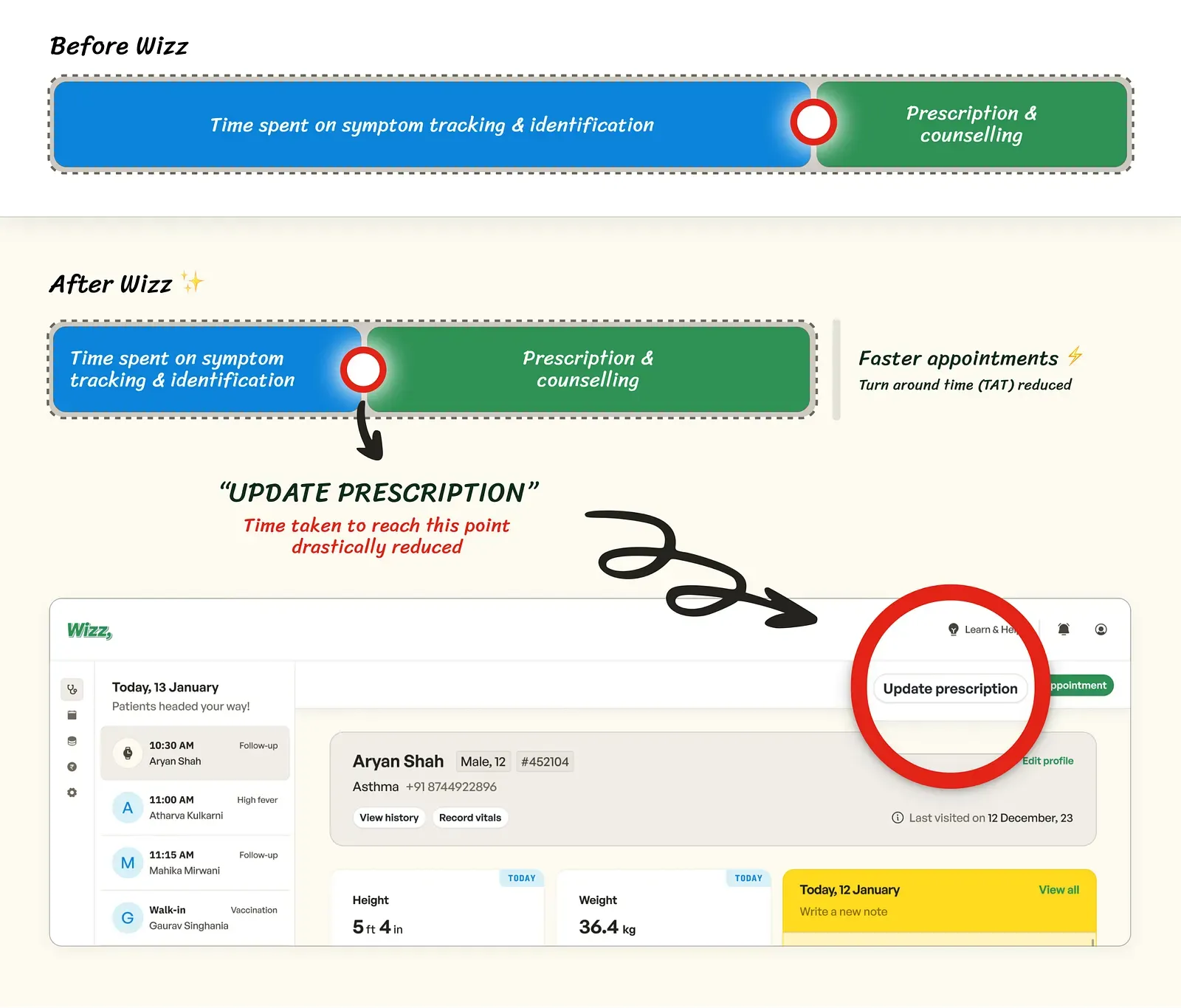
Lesser time taken to reach “update prescription” — The success of the data-rich consultation experience lies in pediatricians spending less time identifying and tracking symptoms, reaching the ‘update prescription’ stage faster.
-
Lower turnaround time — Time spent on consulting chronic patients’ before Wizz vs after Wizz.
-
Patients consulted per day — Data allows pediatricians to consult faster, eventually enabling pediatricians to serve more patients daily.
-
Subscription count — Number of new Wizz watch subscriptions sold per month for chronic patients.
-
Task success rate — Number of successfully finished appointments.
Parents’ app
- Number of missed follow-up appointments — Reducing it, obviously.
- Daily active users — Number of parents who check Wizz every day.
- Number of appointments booked via the app
- Push notification open rate — Tracking the number of push notifications opened is crucial as these notifications are related to health updates.
DebriefWhat I learned
- 01
Expert users and emotional users
Assist one, guide the other.
- 02
Designing the data
Our first time. Fintech apps were the reference.
- 03
Trust
People guard their health like their money.
- 04
AI with restraint
Patterns for doctors, simple insights for parents.
Experts and worried parents need opposite things
Pediatricians wanted help spotting patterns, not conclusions drawn for them. Parents wanted the opposite: one clear answer.
Read the full story
Finally, our top learnings
- Designing for expert users vs emotional users — We dealt with both ends of the spectrum, pediatricians being experts and parents being anxious. The need to assist pediatricians and spoon-feed parents was really difficult to figure out.
- Designing the data — It was our first time visualizing data, and we struggled to keep the data consistent and contextual at all times. Fintech apps were our go-to place.
- Importance of trust — Similar to money, people don’t trust anyone with their health, at every point we were questioned about users trusting our system.
- Use of AI — AI in healthcare requires finesse. Despite initial setbacks, we focused on pattern recognition for pediatricians and simplified insights for parents.